
Steps to register the Integriti XML REST API
Registration
To register for the Integriti XML REST API, go here and fill in the form.
https://license.innerrange.com/Integrations/Create
Field descriptions to be filled in
- Proposed Integration Name: choose a reasonable and meaningful name for your development here.
- Integration Purpose: describe what you are developing
- Integration will be re-used on multiple sites: tick this box if you are developing an Integrit system to be used on multiple separate sites (different Integrit servers).
- Regional Distributor: be sure to select here Inner Range Europe
- Contact Details: please enter the details of the end customer (or if you are the end customer as the developer) here.
- I require an Integriti Demo Key for development: tick here if you are just starting development and do not have a specific Integriti server yet. This will generate a demo Product Key for you, which you can use to install Integriti software, start developing and testing.
- Automatically unlock integration on an existing product key: if you know the specific Integriti installation you are going to develop/integrate on, enter the “Product Key” of the existing registered Integriti software here. You can get this from the customer and/or from the customer’s Integrit software: Administration -> License Manager -> Field Product Key
- Accept: tick the box to confirm that all the fields have been filled in correctly.
- Submit Application: complete and submit the registration application.
Result
Once the registration is done, within 3-5 business days Inner Range will review your completed information and generate a license for your given Product Key, which will activate the ability to use the XML REST API in the software registered with that Product Key.
In addition to the license, you will also be provided with an API Key, which is required to make XML REST API requests. The API Key must be included in the header of the request as the value API-KEY:yourapkey.
NOTE: If a customer with the same data makes additional integrations in the future, the license will be new but the API key will remain the same.
Launching the Integriti XML REST API service
If you have an XML REST API integration license, it is included in the Integriti system and you have also received an API key, you need to configure the Integriti server in Integriti.
- Administration -> Communication Handler -> Add New
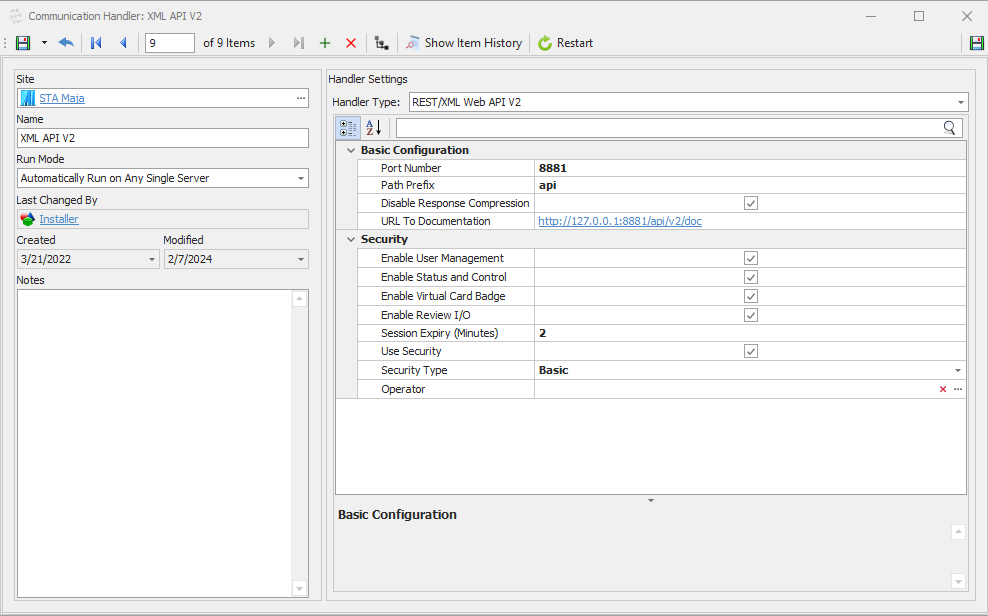
Fields
- Port number: select the port on your Integriti server machine to be queried.
- Path prefix (optional): choose the url prefix that suits you best
- Url to documentation: go to this address. At this link you will find the XML REST API documentation with helpful examples. It is also possible to make simple example queries to the Integrit server.
- Enable User Management: tick this box if your development mainly consists of user management.
- Enable Status and Control: tick here if your development consists of controlling different values (doors, outputs, inputs, etc.) and monitoring statuses.
- Enable Virtual Card Badge: check this box if your development attempts to show virtual badges. For example, you emulate a card passing through a door.
- Enable Review I/O: tick this box if your development requires Integriti Review events.
- Session Expiry: select here the time when your session expires
- Use Security: tick here if you need authorisation to make queries
- Security Type: select Basic (Basic Auth) or HTTPS (HTTPS authorization) security. NOTE: HTTPS requires a certificate and must be provided by an Integriti server administrator or similar.
- Operator: select here the Integriti Operator that can query the Integriti server.
- Save settings
Once you have made and saved the settings, you will see its status in the Communication Handler list.

The Integriti XML REST API is now activated, configured and ready for use.