
How do I start subscribing to HID mobile cards?
- The subscriber or the installer/customer’s representative can go to https://portal.origo.hidglobal.com/selfonboarding/ and create an account.
- If you need help with your account, you can do this with Evidence Network Estonia technical support or an installer representative.
- Once an account is created, 2 information badges are required to subscribe to mobile user licences:
- Organization ID
- MOB key (read also https://evidence.ee/2025/10/21/kuidas-tuvastada-org-id-ja-moba-ja-kuidas-tellida-hid-mobiilsete-kaartide-litsentse/)
- Once the account is created, the customer can choose X number of mobile cards to try. I would recommend that you choose the one you will use in the future, i.e. choose the same card format (e.g. 26bit), but not the same card number range or site-code. This is because it is not possible to transfer a trial licence to a full licence with the same card numbers and all trial cards must be replaced when transferring to a full licence.
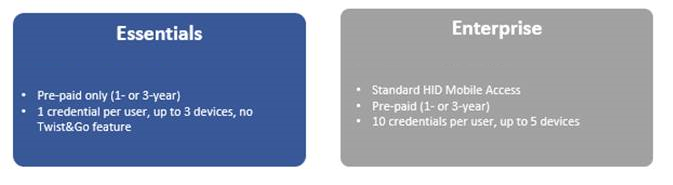
- If the trial period is over or if you want to order real licences, you can order real licences. Minimum quantity = 20pcs. You can choose between Essentia or Enterprise licenses:
If a client wishes to manage the Inner Range from the Integrit, the correct functionality must be activated in the Integrit for the two systems to communicate. This requires a license (INTG-996964, Mobile Credential Management Integration, link to our B2B environment). If you use the Inception centre, the maps are managed in the Origo portal and have to be entered manually in Inception (some symbol + map).